
No matter the industry, long-term business growth depends on strong customer relationships, which all start with one basic ability: knowing your customers.
Not just their names and contact details, but things like. What have they bought before? What questions have they asked? What feedback have they left through emails, calls, social media comments, or support tickets? Every interaction leaves a small trail of data, and together, those details tell you when a customer is interested, confused, ready to buy, or about to walk away.
And it doesn’t stop with existing customers. Potential customers matter just as much. Who they are, how they found you, and what they’re interested in all play a huge role in whether those leads eventually turn into real revenue.
When a business is small, you can sometimes get away with managing all this in your head, in notes, or across a few spreadsheets. But as customer numbers grow, things start to fall apart. Information gets scattered, details get missed, and “I think we talked to them before” becomes a daily phrase. Memory, notes, and messy spreadsheets simply don’t scale.
That’s usually the moment teams start asking the same question. Should we be using a system to manage all our customer information in one place?
At that point, a CRM stops being a nice-to-have and starts becoming a necessity.
And then you do a quick search for “CRM”. Suddenly, you’re staring at a crowded landscape. Free tools, enterprise platforms, industry-specific solutions, and everything in between. They all call themselves CRMs, but they’re not built for the same needs.
So what exactly is a CRM system, really? And how do you know which type makes sense for your business?
In this article, we’ll break down what a CRM is, explain the different types of CRM systems on the market, and help you figure out which option fits your business best.
Most people hear “CRM” and immediately think of some fancy software. But at its core, CRM—short for Customer Relationship Management—is just a way to track and manage your interactions with customers. That could be as simple as remembering regulars by name, jotting notes in a notebook, or using Excel to store contacts. The difference is how efficiently you can manage it and how much info you can actually keep track of.
And “customer” doesn’t always mean a buyer in the traditional sense. In a property management company, both landlords and tenants are treated as customers, each with their own records, interactions, and history. In a private school or training center, the “customer” may be a student, with enrollment details, communications, and progress tracked over time. At Wishbone Site Furnishings, customers are the business accounts placing orders, with orders, products, and production progress tracked under each account. In other words, CRM works across industries by helping you manage relationships with different types of people or organizations, even if you don’t literally call them “customers.”
Small businesses might get by with memory, sticky notes, or a spreadsheet. But once your operation grows, you need more than just contact info—you need a full picture of every interaction. That’s when you need a CRM.
In the past, CRM felt like something only big companies with massive sales teams and IT budgets could afford. Today, cloud tools and digital platforms make CRM accessible to businesses of all sizes. More than just software, it’s a way of thinking about how you handle customer data—and that mindset alone can make a huge difference.
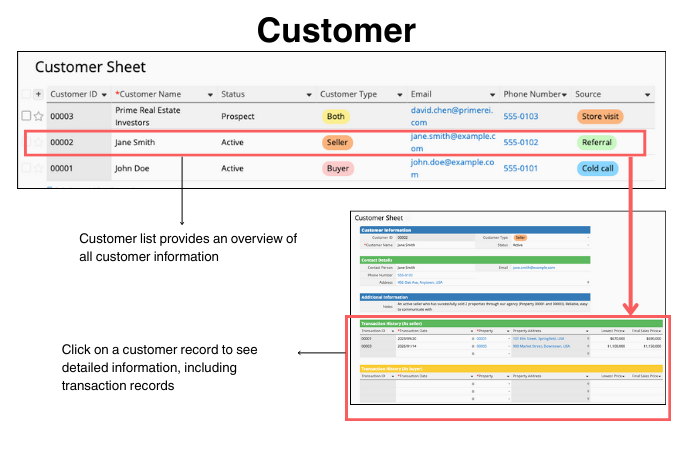
Let’s take real estate as an example. A basic CRM usually starts with a customer list: names, contact info, lead sources, and categories. Click into a record, and you can see everything about that customer—like property viewings, past transactions, or notes from calls and emails.
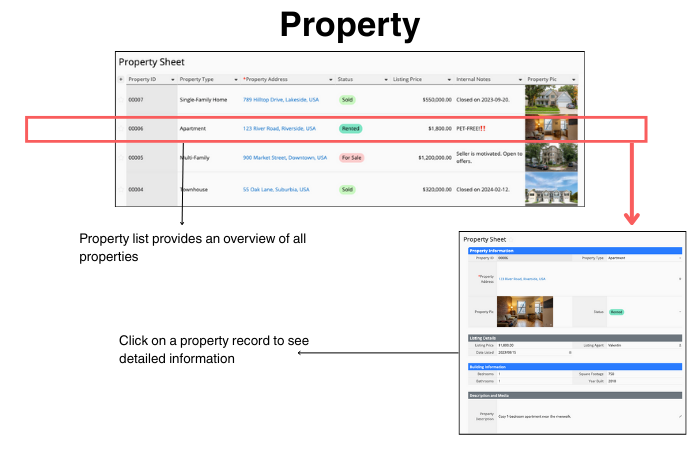
Most CRMs also include related tables for managing items being sold tied to each customer—like properties, products, or projects. This lets you link every interaction to the right record, making follow-ups, tracking, and reporting much easier.
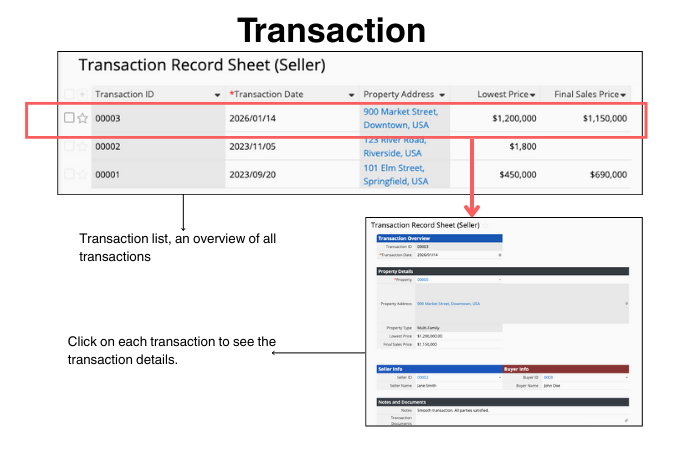
Transaction records give you an overview of all deals. Click on a deal, and you’ll see who’s involved, what was sold, and other details that matter for that specific transaction.
| Industry | Customer | Main Item / Product | Interaction Record |
|---|---|---|---|
| Real Estate | Buyer / Seller | Property | Transaction History |
| Hospitality | Guest | Room Type | Reservation Logs |
| Travel & Tours | Traveler | Vacation Package | Inquiry History |
| Salons & Spas | Client | Service / Treatment | Preference Notes |
CRM and ERP are often mentioned together, but they do different things.
- CRM (Customer Relationship Management) focuses on the outside world: tracking customers, leads, and interactions, helping you understand needs and manage relationships.
- ERP (Enterprise Resource Planning) focuses on the inside world: accounting, inventory, procurement, manufacturing, HR, and supply chains.
Some ERP systems include CRM modules, but having an ERP doesn’t automatically replace a dedicated CRM. Many companies use both, integrating them to get a full view of customers and operations.
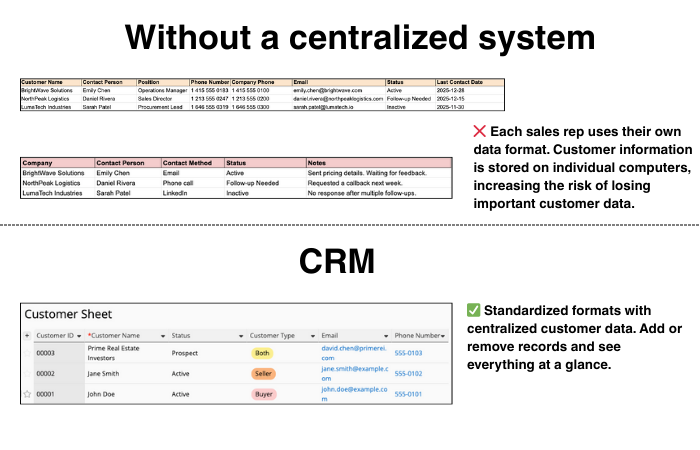
Without a CRM, every salesperson might keep their own Excel files, each with different formats, scattered across folders. Looking up a customer can feel like hunting for a needle in a haystack. If someone leaves without handing off their files properly, critical info can vanish into thin air.
A CRM fixes this by storing all customer data in one place. Everyone sees the same records, updates are visible in real time, and accidental deletions or lost info become much less likely.
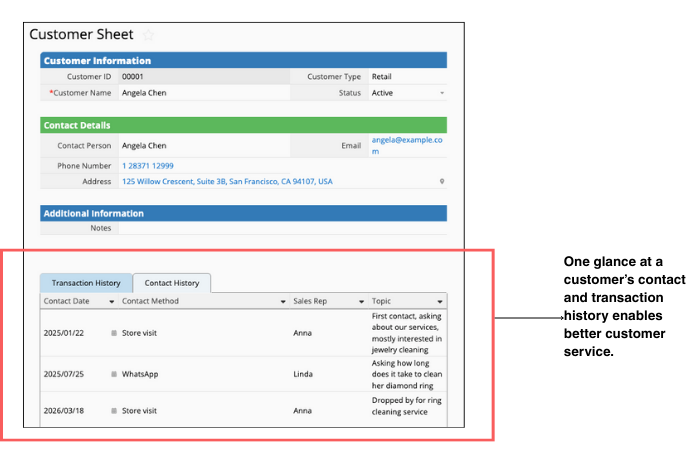
Customers reach out through multiple channels—Facebook messages, emails, website visits, calls, or in-person chats. If all those touchpoints live in separate files or departments, it’s impossible to see the full picture.
A CRM consolidates everything. Teams can view a customer’s complete history, from past purchases to complaints or questions. That means no more gaps in knowledge, smarter marketing, and more personalized service.
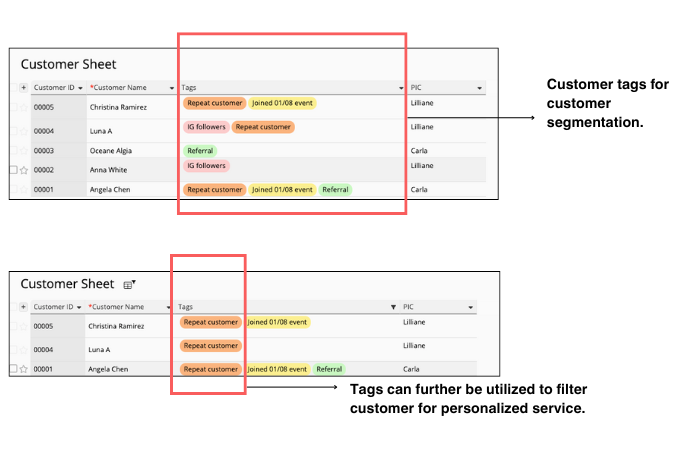
As data accumulates, patterns start to appear. Some customers discover you through campaigns, others are repeat buyers, and some are loyal long-timers.
A CRM lets you tag and categorize customers—think “frequent buyer,” “high engagement,” or “prospective lead.” You can even flag tricky or high-maintenance clients. Segmentation helps teams focus on the right audience, target promotions accurately, and deliver service that actually hits the mark.
Which products are flying off the shelves? Who’s buying what? With a small customer base, you might eyeball it. But as your business grows, manual tracking becomes a headache.
A CRM, combined with BI tools, makes it easy to visualize trends. Spot popular products, understand demographic preferences, and see which campaigns drive real sales. Instead of guessing, you make decisions backed by data.
Best for: very early-stage teams with simple needs
When a business is just getting started and customer volume is still low, there may be no budget or urgency to adopt a dedicated CRM. In this stage, spreadsheets are often the easiest way to organize customer information without changing how the team works.
Pros
- Very low cost
- Familiar interface. Little to no learning curve
- Highly flexible. Easy to add or change fields
Cons
- Poor scalability as data grows
- Limited collaboration and access control
- No built-in structure for sales processes or customer history
Excel, in particular, is not designed for collaboration. Teams often end up with multiple versions of the same customer list, leading to fragmented data and inconsistent records.
Google Sheets handles collaboration better, but as the number of sheets increases, version confusion and permission issues can still occur. Access control is relatively basic, which increases the risk of accidental edits or deletions.
Spreadsheets work well as a temporary solution. Once customer volume and process complexity increase, they quickly become a bottleneck.
Best for: organizations with highly unique workflows and strong technical resources
When a company has very specific requirements. Such as complex system integrations, highly customized workflows, or advanced reporting that off-the-shelf CRMs can’t support. A custom-built CRM may be considered.
Pros
- Fully tailored to internal processes
- No need to adapt workflows to a predefined product
- Maximum flexibility in system design
Cons
- High upfront cost
- Long development and implementation cycles
- Ongoing maintenance requires technical resources
Whether built in-house or outsourced, custom CRM projects tend to be time-consuming and expensive. After launch, the system still requires continuous maintenance, debugging, and updates.
This approach is best suited for organizations with sufficient budget, long-term technical commitment, and workflows that cannot reasonably fit existing CRM products.
Best for: Mid to large organizations to support multinational operations, and provide standardized, end-to-end process management.
For example: Salesforce, SAP, Oracle, Microsoft Dynamics 365
Pros
- Comprehensive feature sets
- Strong support for complex sales and service processes
- Deep integration with ERP and other enterprise systems
Cons
- High licensing and implementation costs
- Steep learning curve
- Customization usually requires technical teams
These enterprise CRM platforms are often tightly integrated with ERP systems, allowing customer data to flow across sales, finance, and operations. This makes them suitable for organizations that need cross-department visibility at scale.
However, the trade-off is complexity. Implementation and maintenance require significant time and manpower, making these platforms a better fit for enterprises with dedicated IT teams and large-scale operations.
Best for: SMBs with relatively standardized workflows
For example: HubSpot, Zoho
For many small and medium-sized businesses, enterprise CRM systems are too costly and complex. At the same time, spreadsheets no longer provide enough structure. This is where off-the-shelf SMB CRM tools can become the solution.
Pros
- Faster to deploy than enterprise systems
- More affordable
- Built-in CRM best practices
Cons
- Limited flexibility for non-standard workflows
- Customization has clear boundaries
- Can become restrictive as processes evolve
Tools like HubSpot and Zoho offer core CRM features such as customer records, interaction tracking, and marketing activity management. They work well when workflows align with common sales models, but can feel restrictive when businesses need to manage more customized processes.
Best for: teams that need flexibility without the resources to develop a custom system
If your workflows are not fully standardized and may change over time, no-code platforms such as Ragic offer a middle ground between spreadsheets and custom-built systems.
Pros
- High flexibility to customize your system, even without coding or technical expertise
- Faster setup than custom development
- Lower long-term maintenance costs
- Intuitive and easy to learn
Cons
- Requires some upfront thinking about data structure
- Must learn the platform to build effectively
No-code platforms allow teams to design their own CRM systems using visual tools and templates. Compared to custom development, they significantly reduce development time and communication overhead, while still allowing businesses to adapt the system as their processes evolve.
As a highly flexible no-code platform, Ragic lets you design a CRM system that fits your needs, whether your process is simple or complex.
If your needs are basic, such as storing customer information, leads, or sales opportunities, you can start with Ragic’s ready-to-use Quick Templates.
If you also need to manage products, create quotations, and track contracts with customers, Ragic’s CRM template helps you manage the entire sales process in one system.
If your workflow is less standardized and doesn’t fit typical templates or modules, you can use our documentation, like our database design guide, to build the CRM of your needs!
Or, to help you get started, you can also use Ragic AI to generate a database structure and fine-tune it based on your workflow, creating a CRM that truly matches how your team works.

